
Keenbase Trading » Blog »
What is Equity in Forex? A Detailed Explanation.
Equity is your account balance plus the profit or loss of every position you currently have open.
Closed trades are not counted again. Their result is already sitting in the balance. With no positions open and nothing else adjusting the account, balance and equity are the same number.
A worked example: you deposit $3,000 and open two trades. One is down $150, the other is up $250. Your balance is still $3,000, because nothing has been settled. Your equity is $3,100.
Close both and that $100 moves into the balance. Nothing was created. It just stopped being provisional.
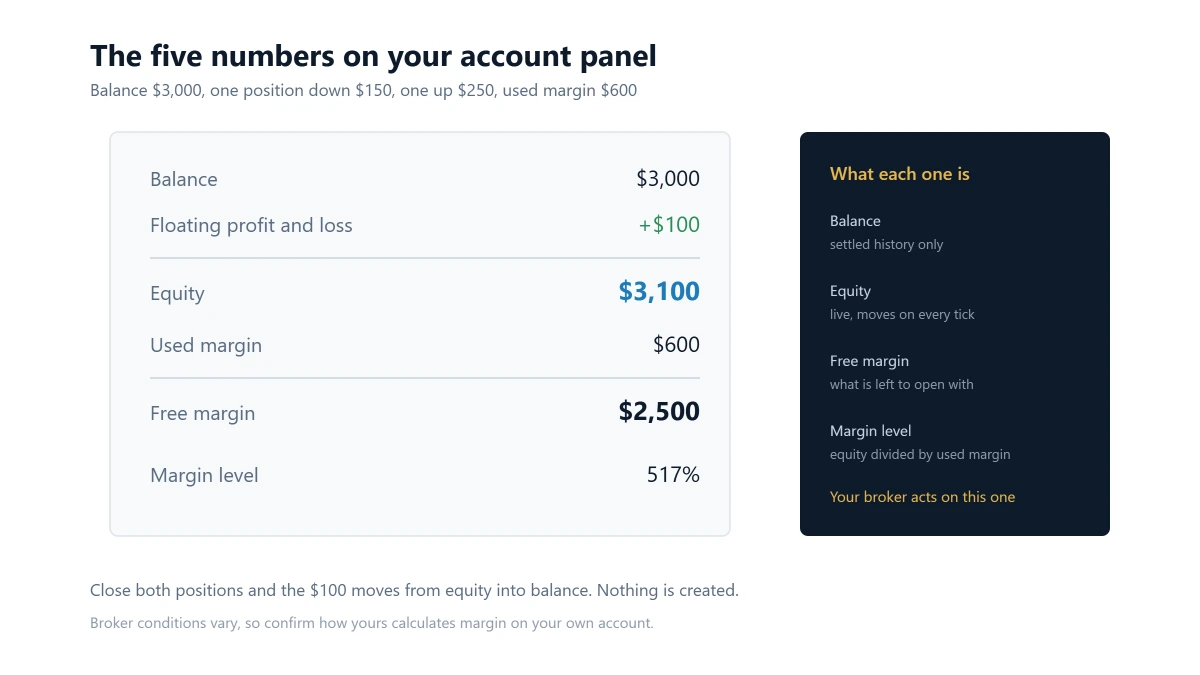
Balance is a record. Equity is a valuation.
The two numbers answer different questions, which is why your platform shows both.
Balance records completed events: deposits, withdrawals and the results of trades you have closed. It changes only when something finishes. It is a history.
Equity revalues your open positions at the current price, on every incoming tick. It estimates what you would have if you closed everything right now, at the price available right now.
So an account can show a $10,000 balance and $9,200 of equity. The missing $800 has not left the ledger. It is the floating loss on positions that are still open.
The reverse happens just as often. The same account with $800 of floating profit shows a $10,000 balance and $10,800 of equity.
On MetaTrader 5 the server calculation can also account for credit and blocked funds, and MQL4’s equity reference notes that the exact calculation depends on trading server settings. The formula above is the part that matters for almost every account.
What moves equity while you are doing nothing
Price is the obvious one. These are the ones people miss.
Swap: positions held past the broker’s rollover accrue a financing charge or credit, and in MetaTrader that lands inside the position’s profit figure. Your equity can differ in the morning with the price unchanged.
Commission: charged per lot on many account types, reducing what you are actually holding from the moment the position opens.
The spread, immediately: a new position starts marginally negative, because it is valued at the price you could close it at rather than the price you paid. Equity dips the instant you open a trade, before the market has done anything at all.
None of these show up in the balance until the position closes.
Free margin starts from equity, not balance
Free margin is the part of your equity that is not currently tied up supporting open positions.
margin level = (equity ÷ used margin) × 100
If equity is $8,000 and used margin is $2,000, free margin is $6,000. If your open trades then lose another $1,000 while the margin requirement stays the same, equity falls to $7,000 and free margin falls to $5,000.
That is why free margin can shrink on a day your balance never moved. Floating losses reduce equity first, and free margin is calculated from the lower number.
Margin calls and stop-outs do not work the way most articles describe
The usual explanation is that a margin call happens when equity drops below some level and your broker rings up demanding a deposit. That is a stocks-brokerage image and it is not how MetaTrader works.
The trigger is margin level, the ratio above, not equity on its own. MetaTrader exposes both thresholds to any program on the terminal: the MQL5 account properties reference lists a margin call level and a stop-out level, and notes that each can be set as a percentage or in the account currency depending on the account’s mode.
What actually happens: a margin call is an account state rather than a phone call. As margin conditions deteriorate, new exposure is restricted. If the stop-out level is reached, the trade server begins force-closing positions itself.
Because the trigger is a ratio, a losing position hurts twice. It pulls down equity, the numerator, while the margin requirement holding up the denominator stays where it is.
Thresholds are broker and account specific. Check the current trading conditions on your own account rather than trusting a percentage quoted in an article.
Where to find it, and why the number can be stale
In MT4 it is in the Terminal window on the Trade tab. In MT5 it is in the Toolbox, also on the Trade tab. Both show balance, equity, margin, free margin and margin level side by side.
Equity updates when a new quote arrives. That has a consequence worth knowing: if your connection drops, the equity on your screen freezes at the last tick you received while the broker’s server carries on revaluing your positions against the live market.
The number you are looking at is only ever as current as your last quote.
Equity drawdown and balance drawdown are not the same event
Balance drawdown only becomes visible once losses are realised. Equity drawdown can appear long before any losing trade is closed.
This matters most when several positions are open at once. A strategy can show a smooth balance curve while its equity fell much further between closed trades.
For anyone running an EA, that has a direct consequence: a report built only from closed trades understates the pressure the account was actually under. The balance curve is the tidied-up version.
The useful question is not only how far your balance fell. It is how far equity fell while those positions were still live.
Why every account-level rule is written on equity
Once you notice this, it is everywhere. A prop firm’s daily loss and maximum loss rules test equity, which is why an open position moving against you can breach a rule on a day you closed nothing.
An account-level protection EA watches equity for the same reason. Balance would tell it nothing until the damage was already settled.
A rule also has to define two things, not one: the live value it monitors, and the baseline it measures from. A daily loss limit anchored to start-of-day balance and one anchored to start-of-day equity are different rules wearing the same percentage.
If you are trading to a rule
Your broker’s stop-out is a last resort. It exists to protect the broker, it fires on margin level, and by the time it acts the decision has been taken out of your hands.
KT Equity Protector EA exists to put an earlier line inside that one. It watches account equity from a single chart and acts when a level you set is crossed, closing positions and cancelling pending orders before the boundary you care about is reached.
It does not trade or choose direction. Its daily loss rule can anchor to start-of-day balance or equity, or to the previous close of either, and its max loss rule to the initial balance, a custom starting balance, or a trailing peak.
The equity trailing stop works on account equity directly, arming after a profit you choose and firing if too much of the peak is given back.
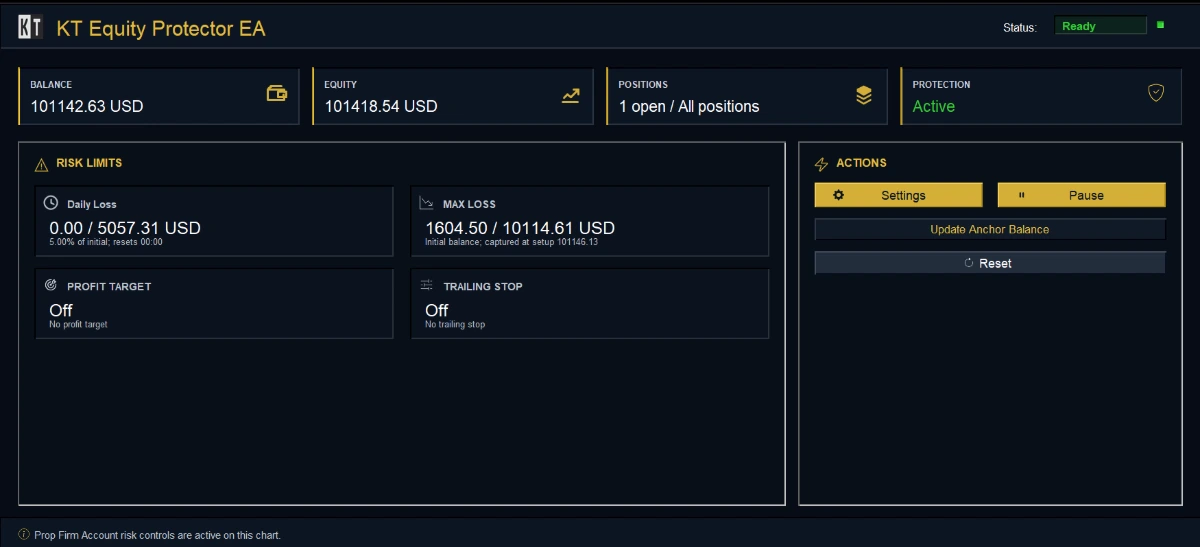
What it does not change: the broker’s stop-out is still the broker’s and still fires on margin level regardless of anything running on your terminal. And it cannot act while MetaTrader is closed, which is the argument for a VPS if the protection needs to be continuous.
Which number answers which question
- What have I actually made or lost: balance.
- What is the account worth right now, open trades included: equity.
- How much room do I have to open something new: free margin.
- How close am I to the broker stepping in: margin level.
Equity sits underneath all four, because floating profit and loss reaches equity before it reaches anything else.
If you check your balance and think you know where you stand, you are reading a historical record. Equity is the live number, and it is the only one your broker, your prop firm and your own risk rules ever act on.
Protect your account equity with KT Equity Protector EA
About this article
Published by Keenbase Trading. We have been trading since 2018 and we build MetaTrader 4 and MetaTrader 5 indicators, Expert Advisors, free tools and custom development, including the account protection EA discussed above.
Margin call and stop-out levels are set by your broker and differ between accounts, so confirm the current conditions on your own account before relying on any figure.